
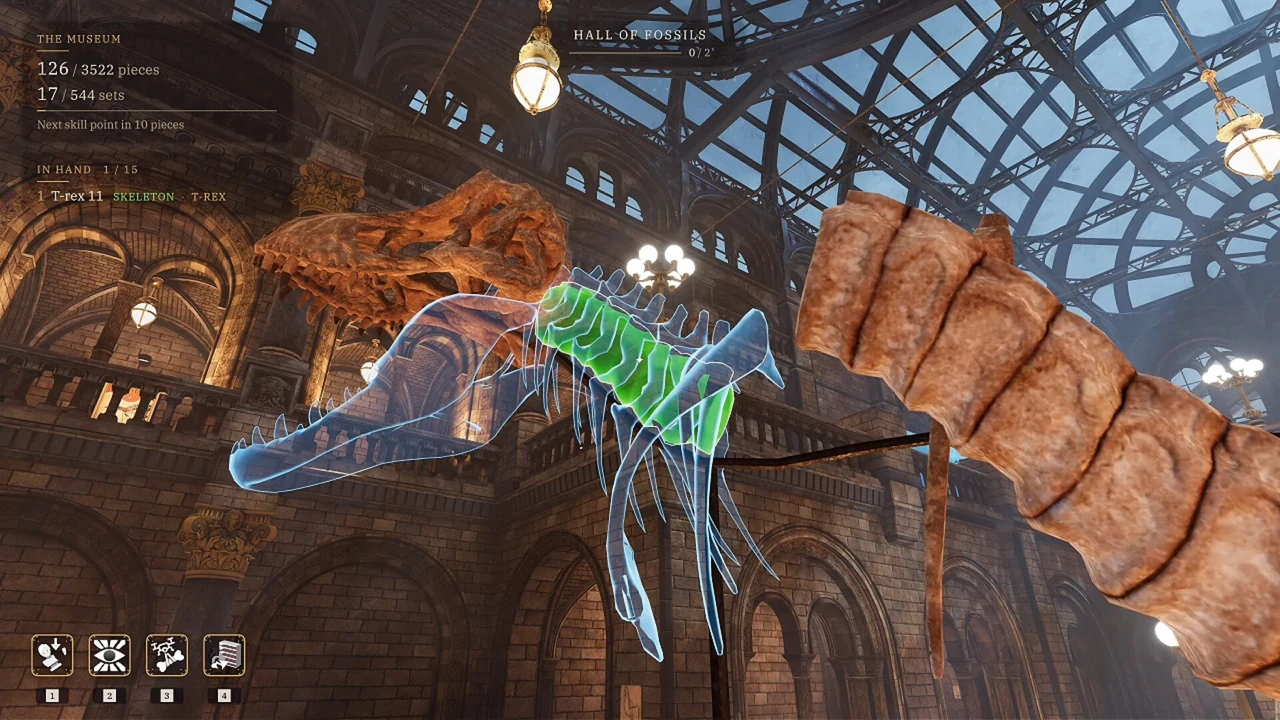
Easy Placement narrows the exhibit, not every decision
The 1 October patch describes Easy Placement as a way to keep a piece within its own exhibit and show only that exhibit's outlines. This removes some ambiguity when several nearby displays have similar shapes. It does not say that the option automatically assembles the object or highlights one exact correct slot for every fragment.
After turning it on, compare the fragment with the remaining outline of its exhibit. Look at a distinctive edge, joint, or protrusion rather than the whole silhouette at once. Our suggested method is to solve the most recognizable local shape first, then use that placement to judge the neighboring fragments. This is a visual comparison routine, not an additional hidden placement rule.
The 2 October update also added a difficulty question when starting the game. Players who had already answered the initial questions were shown them again, with existing settings retained unless changed. If the option appears during that setup flow, it is the same Easy Placement feature; it is not evidence that your previous save has been reset.
Separate an unfamiliar slot from an incorrect exhibit
When a piece refuses to fit, ask two questions. Are you working on its own exhibit? If so, is the piece actually aligned with the outline you are trying? Easy Placement addresses the first question by reducing the possible exhibit. It does not remove the need to inspect the fragment itself.
Use a clear feature as your reference: a bent edge, the end of a shaft, or a break where another piece will connect. Compare that feature with the outline from more than one viewing angle. A position that looks close from one angle can still obscure a mismatch. Move your viewpoint before repeatedly attempting the same placement.
If you want to use active assistance rather than place by hand, the skills guide explains how to choose the held target. If you are pursuing Nobody Asked for Help, keep its active-skill restriction in mind before trying a placement tool.
Protect fragments that are already correct
The 25 September update changed removal behavior to reduce accidental dismantling. A quick interaction no longer pulls out a correctly placed fragment. Removing it deliberately requires holding the interaction until the prompt's bar fills. A wrongly placed piece remains removable with a quick interaction.
That distinction matters when two fragments sit close together. Do not interpret the inability to remove a correct piece with a quick tap as a broken control. Inspect the prompt and decide whether removing it is actually necessary. If the piece is correct and you are simply reaching for a neighboring wrong piece, change your viewpoint and target the intended fragment more carefully.
Lock Correct Pieces goes further by protecting correct placements. Enable it through Options > Game > Comfort when accidental removal interrupts your work. If you later need to inspect a protected fragment, check the setting before concluding that every interaction with the object has stopped functioning.
A short diagnosis for pieces that still refuse to fit
- Confirm you are using the current game update.
- Check the held-fragment name and the intended exhibit.
- Enable Easy Placement if multiple exhibit outlines are confusing you.
- Compare one distinctive part of the fragment with the outline.
- Inspect the fit from another angle.
- Identify whether you are trying to insert a fragment or remove one already placed.
- If the same fragment still cannot be handled correctly, record its exact name and number for a report.
Change only one variable between attempts. For example, turn on Easy Placement and test the same piece before changing other settings. That gives you a clear result: the relevant exhibit became easier to identify, or it did not. A sequence of unrelated changes can leave you unable to describe the original problem.
Known placement fixes and their limits
The official updates list fixes for specific sword colliders, pieces that sank into floors or stairs, and fragments that targeted the wrong stand. The 2 October patch names several affected swords, while the earlier achievement update includes fixes for shields, vases, and named exhibits.
Those fixes support updating the game before spending another session on a known troublesome fragment. They do not establish that every uncooperative piece is a collider bug. Do the basic exhibit and alignment checks first. If the remaining problem is reproducible, use Report a Problem from the affected save and include the exact exhibit and fragment. Do not dismantle every completed object or delete your save to investigate a single piece.